Compufield -computer Institute training,learning,academy,colege, specialized in fast track courses in multimedia,web designing,e-commerce,software, in Network engineering,certification courses,fashion, textile,jewellery,interior designing courses. India,Bombay(Mumbai)
ISO 9001:2000 Certified Institute

Our Courses Creative Digital Film Making Web Designing Programming Networking Financial Application Office Automation Kids

Sign up for free Newsletter

    Email ID:

Search for our courses

 
Print Media
Digital Art
Commercial Art
Animation
Diploma in 2D & 3D Animation
Certificate in 2D & 3D Animation
3D Character Studio
3D Animation Pro
3D Studio Max
Maya
Designing Courses
Advance Diploma in Interior / Architectural
Interior / Architectural Pro
Interior Architectural Designing
Jewellery Designing
Jewellery Designing Pro
JewelCAD
Textile Designing
Fashion Designing
Mechanical Designing
Video Editing & Special Effects
Diploma in Video Editing & Visual / Special Effects
Certificate in Video Editing & Visual / Special Effects
Video Editing Pro
Visual / Special Effects
Video Editing (AVID XPRESS)
Video Editing (FCP)
Multimedia
Diploma in Adobe Softwares
Multimedia Pro
Multimedia & Video Editing
Diploma in Flash Action Script
(Level I + II)
Diploma in Flash (Level I + II)
Diploma in Flash (Level I)
Advance
Web Technology & Multimedia
Web Technology & Multimedia (Pro)
Web Designing, Software Engineering, E-Commerce & Global Marketing
Web Designing, Multimedia, E-Commerce & Global Marketing
Web Designing, Multimedia Pro, Software Engineering, E-Commerce & Global Marketing
 

Jewellery Designing Using JewelCAD/CAM
Gallery IV

 
jewelcad, jewellery, jewellry, jewelry, jewelery,  CAD, CAM, web education, computer courses, learning, training, Inida - Mumbai - Bombay  professional training,  school, academy, training center, education, computerized, computer based designing, commercial, fashion, traditional, contemporary, coreldraw, adobe photoshop, jewelcad software, gold, silver, platinum, diamonds, precious or semi-precious stones, gems, Rings, Chain, Pendants, bracelets, necklaces, internet, web, net learning,  designs, illustrations, creative designs,  india, mumbai (bombay)
 
Jewellery Designing Using Coreldraw
Jewellery Designing Using Photoshop
Jewellery Designing Using JewelCAD/CAM


We Teach Computer Generated 2D & 3D Jewellery Designing Using CorelDraw + Photoshop + JewelCAD/CAM

 
Jewellery Designing Using Photoshop
 
Jewellery Designing Using Coraldraw
 
You can learn this course in Mumbai at,
 
Warden road (Grant road east), Bandra & also Online
  Phase I

Introduction to Jewelcad 5.1 (Update 4)

  1. File and View Toolbar
 
  Phase II

Working With Database

 
  1. Inserting object from the database
  2. Learn to select object
  3. Transform Toolbar
  4. Copy Toolbar
    i) Introduction to Copy Toolbar
    ii) Grid settings and measurements
    iii) Cut-Paste Tool
    iv) Vertical mirror copy
    v) Horizontal mirror copy
    vi) Revolve 180 Copy
    vii) Cycle Copy
    viii) Extend copy
    x) Revolve copy

   
Exercises:
 
Exercise 1
Exercise 2
 
     
Exercise 3    
   
  Phase III
Deform Toolbar
 
  1. Bend tool
  2. Bend two size
  3. Taper
  4. Taper two size
  5. Scaled paper
  6. Scaled Taper (Two Sides)
  7. Duplicate – Object Color
  8. Skew – Skew Two Sides
  9. Twist - Skew
   
Exercises:
 
Exercise 4
Exercise 5
 
     
Exercise 6    
 
 
  Phase IV
Curve Toolbar
  1. Simple Two Curves
  2. Vertical/Horizontal mirror curve
  3. Revolve 180 Curve
  4. Cycle curve
  5. Extend curve
  6. Revolve Curve
  7. Circle
 
Exercises:
 
Exercise 7
Exercise 8
 
Exercise 9    


Phase V
Deform Toolbar
  1. Extend
  2. Vertical Revolve Surface
  3. Horizontal
  4. Loft surface
  5. Pipe Surface
 
  Exercises:  
 
Exercise 10
Exercise 11
 
 
Phase VI
Deform Toolbar
  1. Boolean Dis Boolean
  2. Boolean Internet
  3. Boolean Substract
  4. Boolean Union
  5. Cv Select
  6. Cv Edit
 
Exercises:
 
Exercise 12cv
Exercise 13cv
 
     
Exercise 14cv  
   
 
Phase VII

Deform Toolbar

  1. Rail Scale
  2. Rail Scale Semi
  3. Rail Shape
  4. Rail Shape1
  5. Rail Vertical
  6. Rail Loopworld
  7. Rail Horizontal
  8. Rail Loopcenter
  9. Rail Ring
  10. Rail Ring1
  11. Rail Ring2
  12. Rail Ring3
  13. Rail Ring4
  14. 3Rail
  15. 3Rail1
  16. 3Rail2
 
  Exercises:  
 
Exercise 15
Exercise 16


Exercise 17
   
     
  Exercise 18 Exercise 19


Phase VIII
Deform Toolbar
  1. Loop
  2. Prong
  3. Skoop
  4. Socket
  5. Supty
 
Phase IX
Deform Toolbar
  1. Prong setting
  2. Pave setting
  3. channel setting
  4. Bezel setting
  5. Invisibal setting
  6. Flush setting
  7. Presser setting
  8. Nick setting
 
1) 2)  
         
3) 4)  
         
5) 6)  
         
7) 8)  
 
 
  After learning the above topics, you will be given access to the following STEP BY STEP Advance Designs Tutorials with Measurements


Product type : ladies Ring
Types of setting : Bezel & Pave Setting
ID of the ring : 18 mm
 
Shape Size No.of product
Round 3.5 1
Round 1.5 8
toal no.of pieces=9
     
Shang thickness = 1.55 mm is Half of total Thickness of Shang
[0.7mm wall +0.1mm Gap Between wall &
Diamond +1.5mm Dim. +0.1mm +0.7mm = 3.1mm(3.1 / 2= 1.55)]
 
 
Product type : Gents Ring
Types of setting : Invisible setting & Channel setting
ID of the ring : 20mm
 
Shape Size No.of Pieces
Round 1.5 6
Princess 2 9
 
Shang thikness=12mm
 
 
Product type : ladies Ring
Types of setting : Prong & Bezel Setting
ID of the ring : 17.22mm
 
Shape Size No.of product
Round(Bezel) 5 1
Round(Bezel) 2.1 2
Round(Prong) 2.5 2
Round(Prong) 1.7 8
 
Shang thikness=2.4mm


Product type : Ladies Ring
Types of setting : Prong Setting
ID of the ring : 17.22 mm
 
Shape Size No.of Pieces
Round 3 1
Princess 1.4 14
 
Shang thikness=12mm
 
 
Product type : ladies Ring
Types of setting : Pave Setting
ID of the ring : 18 mm
 
Shape Size No.of product
Round 0.8 6
Round 0.6 24
 
 
Product type : ladies Ring
Types of setting : Prong Setting
ID of the ring : 17.22mm
 
Shape Size No.of product
Round 3 1
Round 2.6 6
Round 2.7 2


Product type : Ladies Pendant
Types of setting : Pave setting
  :  
 
Shape Size No.of product
Round 1.5 26
 
Product type : ladies Ring
Types of setting : Prong & pave setting
ID of the ring : 17.22mm
 
Shape Size No.of product
Round 3 1
Round 1.5 1
Round 1.4 1
Round 1.3 2
 
Shang thikness=2.4mm
 
 
Product type : Ladies Pendant
Types of setting : Prong setting
ID of the Ring : 18mm
 
Shape Size No.of product
Round 2 41
Round 2.5 3
   
 
Product type : Ladies Earring
Types of setting : Prong setting
 
Shape Size No.of product
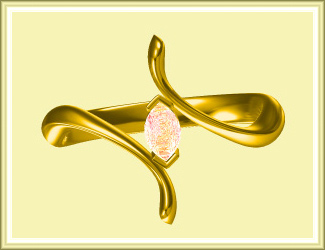
Marquish 5 1
 
Product type : ladies Ring
Types of setting : Flush setting
Type Ring : Spiral Ring
ID of the ring : 20mm
 
Shape Size No.of product
Round 2.2 86
     
Shang thikness=2.4mm
 
Product type : Ladies Pendant
Types of setting : Prong Settig
 
Shape Size No.of product
round 0.8 3
Round 0.86 1
Round 0.87 1
Round 0.95 4
Round 1.00 26
Round 1.03 2


Product type : ladies Ring
Types of setting : Prong & pave setting
ID of the ring : 17.22mm
 
Shape Size No.of product
Round 1.5 30
Round 5.3 1
     
Shang thikness=1.7mm
 
 
Product type : Ladies Pendant
Types of setting : Prong setting
 
Shape Size No.of product
Marquise 5 1
Round 1.5 20
Round 1.5 40
Round 1.5 3
 
Product type : Bangle
Types of setting : Prong setting
 
Shape Size No.of product
Round 1.5 6


Product type : ladies pendant
Types of setting : prong Setting
 
Shape Size No.of product
Round(Bezel) 5 1
Round(Bezel) 2.1 2
Round(Prong) 2.5 2
Round(Prong) 1.7 8
 
Shang thikness=2.4mm
 
 
Product type : ladies Ring
Types of setting : Pave setting
  :  
 
Shape Size No.of product
Round 0.7 11
Round 0.8 2
Round 1 2
 
Product type : ladies Ring
Types of setting : Pave setting
ID of the Ring : 17.22m
 
Shape Size No.of product
Round 5.2 28
Round 2 1


Product type : Ladies Bangle
Types of setting : Prong Setting
ID of bangle   60mm
 
Shape Size No.of product
Square 4 8
Round 3 112
 
 
Product type : Ladies Bracelet
Types of setting : Prong & Pave Setting
ID of bangle   20mm
 
Shape Size No.of product
Round 3 1
Round 1.5 14
Round 2 16
Round 1.7 28


HOME compufield.com
Franchise business partner,required in all parts of India-World Franchise
Enquiry
IT Corporate training, college having more than 24 years experence,class,institute located in Mumbai-Pune-India IT Corporate Training
View our student project galleries in different subject/ courses Student Project Galleries
Our Students Reviews/ Testimonial Student Reviews
Located in BANDRA (West), O’Priya Bldg., 1st Floor, Dr.Peter Dias Road, Opp. Mehboob studio Mumbai 400 050
BANDRA (West)
online interactive training, distance learning courses in 3d animation, multimedia, digital art, graphics, interior, fashion , jewellery, jewelry, jewelery design, e-commerce, and web development online Training
Any Course,
Any Time, Any Where
Free e-cards, beautiful, musical, colourful,animated,greeting for every occasion Free E-greetings
For ever occasion

Students Registration
Registration Form
Payment Facilities
Visa to Apply
Accommodation
Course Schedules
Indian Consulates
 
Miscellaneous
Location of Compufield (HO.)
Site Map
About Us 
FAQ
Our Centers

Enquire About This Course
Classroom Training In Mumbai - India Only
*Name
Mobile
(Number-Coutry code & city code)
e.g. +91-22-23676218
*Email
*Course Of Interest
Enquiry
(*) Signed fields are mandatory.
*** Data entered in the form
will be kept confidential..


register
Management has full right to Change courses, contents, tuition fees without prior notice

COMPUFIELD offers a unique style of learning -

Solve your Queries Online related to our Courses
Mobile Number
M.E. Khairaz (MD)
Gmail
Yahoo Messenger
Yahoo
ICQ
MSN
Skype

Facebook

Twitter
Address (HO) : Chinoy Mansion, First Floor, Block #2, Opp. St.Stephen's Church, Warden Road, Mumbai - 400 036, India. +91-22-23676218 / 23671772
 
Best viewed with IE 4.x and Firefox @ 1024 X 768 screen resolution Copyright © 1999 by COMPUFIELD Institute
All rights reserved. Revised:
The site is Hosted on Web-India